# Capture typing
Folge doesn't only create steps from your clicks - it also creates steps from the text you type. Type into any field while capturing, and Folge adds a step like Type "John" with a screenshot of the filled-in field.
# How it works
- Click into a field and start typing.
- When you pause, Folge creates a step titled
Type "..."with the text you entered. - If you keep typing in the same field, the same step is updated - one clean step per field, not one per pause.
- Pressing Tab or Enter, or clicking somewhere else, finishes the step.
You don't need to type carefully for the capture: corrections, pasted text, accents, and non-Latin input (Japanese, Chinese, Korean, ...) all come out right - the step shows the final text as it appears in the field, not your editing history.
The click on a text field and the typing that follows are merged into a single step: instead of Click "First name" + Type "John" you get one Type "John" step.
Passwords
Passwords and other secure fields are never recorded.
# Settings
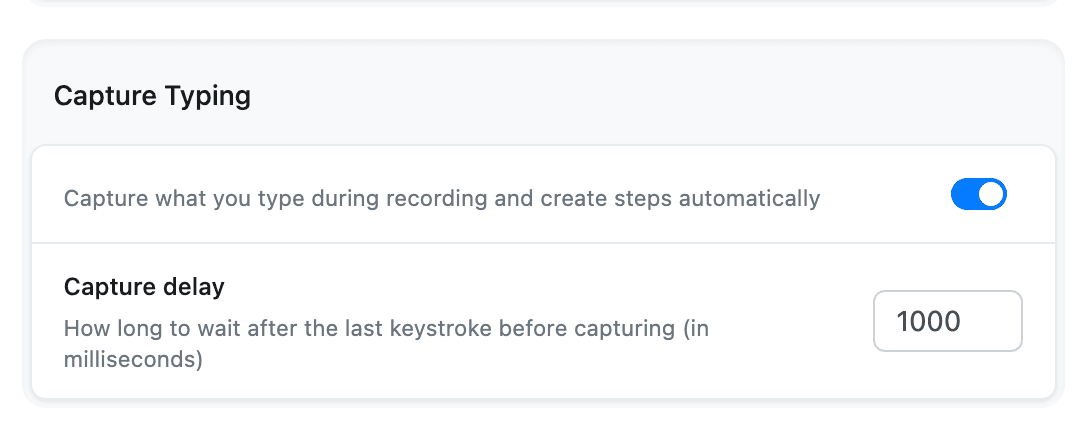
Capture typing is on by default. You can toggle it in Settings > Capturing > Capture Typing, or directly in the capture options of the floating capture menu.
- Capture delay (default 1000 ms) - how long Folge waits after your last keystroke before capturing the step. Increase it if you type with long pauses and your text gets split across steps.