# Smart step titles
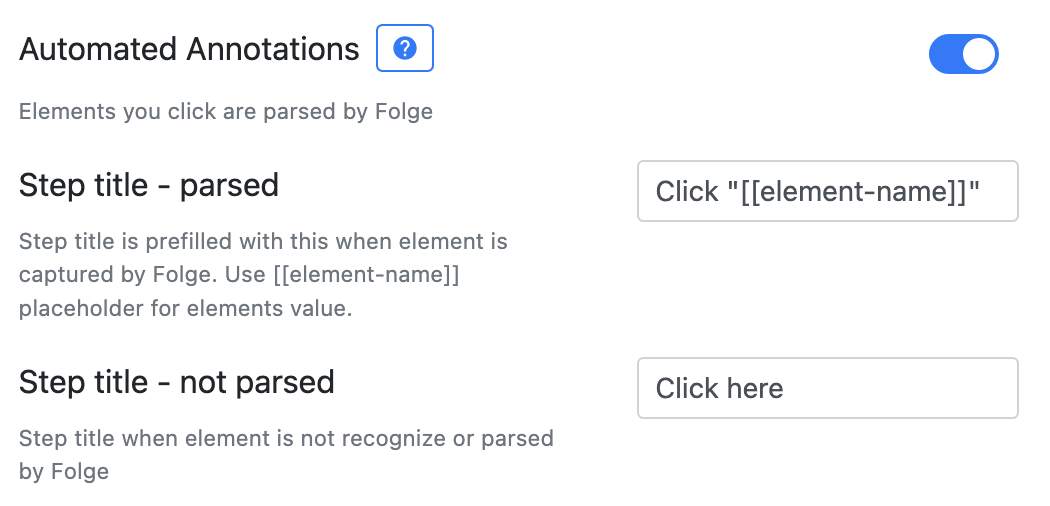
When Automated annotations is on, Folge doesn't just fill in the name of the control you clicked - it also picks the action verb that fits that control. So instead of every step starting with "Click", you get titles that read like a human wrote them:
| You clicked… | Folge writes | Instead of |
|---|---|---|
| A dropdown, combo box, or radio button | Select "Country" | Click "Country" |
| A text field you then type into | Type "john@acme.com" | Click "Email" + a separate typing step |
| A button, link, tab, menu, or anything else | Click "Save" | Click "Save" |
The element's name (Country, Save) is still extracted the same way as before - the change is the verb in front of it.
# When each verb is used
Folge is deliberately conservative here: a wrong verb reads worse than a plain "Click", so it only swaps the verb when it's confident about the control type. Anything it isn't sure about stays Click.
- Select - dropdowns / popup buttons, combo boxes, and radio buttons.
- Type - text fields you type into, handled by Capture typing: the click on the field and the typing that follows merge into a single step titled with the text you actually entered.
- Click - the default for everything else (buttons, links, tabs, menu items, sliders, checkboxes, and any control Folge can't classify). A click on a text field that you don't type into also stays a plain Click step.
Why there is no "Enter" verb
An earlier version titled text-field clicks Enter "Email". That put the field's name in the spot where typed content belongs, so it read as "type the literal text Email" - outright ambiguous in languages like German, French, or Japanese where the verb literally means "input". The typed-text title from Capture typing says what actually happened instead.
Why checkboxes still say "Click"
Verbs like "Check", "Uncheck", or "Toggle" depend on knowing whether the box is currently on or off. Folge can't yet read that reliably inside native desktop apps, and guessing wrong ("Check" on an already-checked box) is worse than a neutral "Click". Those verbs will come once that state can be detected reliably.
# Language
The verbs are written in your Guide language, not hard-coded English. A dropdown becomes Select "Land" in German or Sélectionnez "Pays" in French. You choose the language in the Automated annotations settings - it defaults to your app's interface language but can be set independently, so you can run Folge in one language and still write English (or any other) guides.
# When nothing can be parsed
If Folge can't identify the clicked control at all, none of the verb logic applies - the title simply falls back to "Click here" (in your Guide language), exactly as before. Your titles never come out worse than a plain, safe default.
# Platforms
Smart step titles work on both macOS and Windows. As with all of Automated annotations, how well a control is recognized depends on the application or website exposing meaningful accessibility information - see the note on Automated annotations for details.