# Export to WordPress
Folge can natively publish any guide to a self-hosted WordPress site via the WP REST API. Open any guide, click Export, and select Export to WordPress.
# Setting up the connection
WARNING
This integration only works with self-hosted WordPress. WordPress.com sites use a different API, and Application Passwords there are gated to Business-plan subscribers.
Open the Connection Settings tab and click Add account. You can add as many WordPress accounts as you need (for example a company blog and a documentation site) and switch between them when publishing.
For each account you need:
- Account name - any label to tell your accounts apart, e.g.
Company Blog - Full URL to your WordPress site - including any subfolder if WP is installed in one (e.g.
https://site.com/blog/) - Admin username
- Admin password or an Application Password
We strongly recommend using an Application Password - it can be rotated independently of your main login and limits blast radius if leaked. How to create an Application Password.
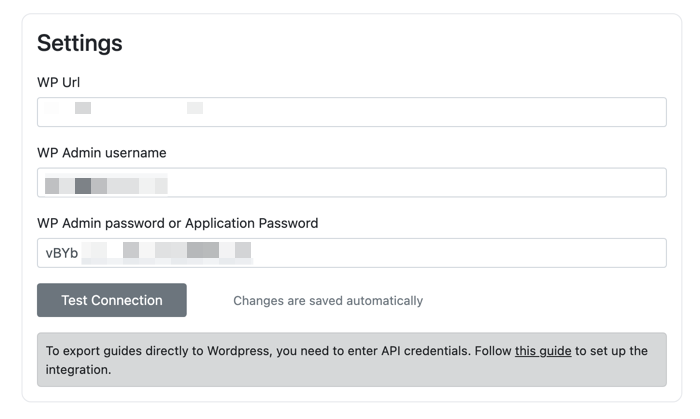
Two more options are available per account:
- Content format -
Gutenberg blocks(default) orClassic HTML. Gutenberg is the block editor built into WordPress since version 5.0. See Content format below. - Ignore SSL Certificate Errors - enable this only for sites with self-signed or otherwise untrusted certificates, for example an intranet WordPress.
Click Test Connection to verify the credentials before saving.
# Publishing a guide
Folge can publish a guide as a Page, a Post, or any custom post type registered on your site. This works with documentation plugins that store articles in their own post type (BetterDocs, weDocs, Heroic Knowledge Base and similar), as long as the post type is exposed through the REST API.
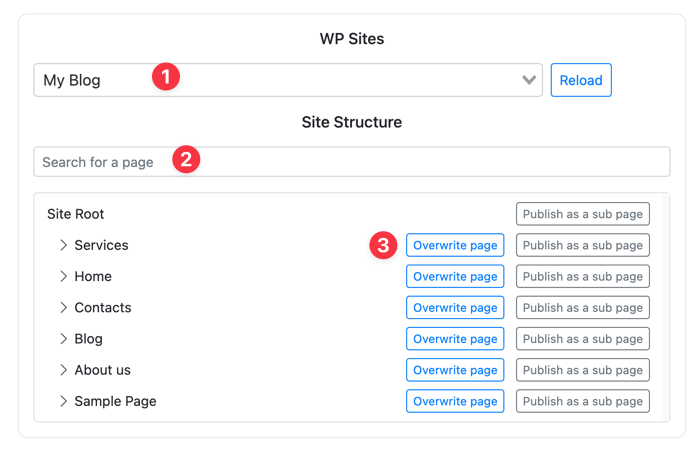
- WordPress site - pick the destination site if your WordPress instance hosts multiple sites (multisite). Click Reload to refresh the list.
- Content type - choose Pages, Posts or one of your custom post types. The list is loaded from your site, so anything a plugin registers shows up here automatically.
- Publish as new - creates a new item of the selected type at the top level.
- Search - find an existing item by title.
- Action per item - for each item in the tree, you can:
- Update - overwrite an existing page or post with this guide
- Publish as a sub page - create the guide as a child of the selected item (only for hierarchical types such as Pages)
If you update an existing item, Folge will remove that item's previous attachments and replace its content entirely with the new guide.
TIP
Updating an item takes ownership of it for this guide. Future re-publishes of the same guide will update that item rather than creating duplicates. The last published destination is shown above the tree.
Once published, Folge opens the item in your browser. New items are created as drafts so you can review them in WordPress and publish when ready. Updating an existing item keeps its current status.
# Content format
By default Folge exports guides as native Gutenberg blocks: headings, paragraphs, images, lists, notes and sub-steps all become regular blocks that you can edit in the WordPress block editor like any other content. The guide is wrapped in a single Group block, and anything you add to the page outside that group (an intro, a footer) survives when you re-publish the guide from Folge.
If your site uses the Classic Editor plugin, or a security filter on the server strips the block markup, switch the account to Classic HTML. In this mode the guide is published as one block of plain HTML.
Folge checks the result after publishing. If WordPress modified or did not recognize the exported blocks, you will be asked whether to switch the account to Classic HTML and publish again with one click.
# Troubleshooting
# "Failed to search WordPress pages: Unexpected token '<'"
Folge expects JSON from the WP REST API, but the site returned HTML instead. The usual cause is WP_DEBUG being enabled: PHP notices and warnings get printed in front of the JSON response and break it.
Open wp-config.php and make sure debugging is off:
if ( ! defined( 'WP_DEBUG' ) ) {
    define( 'WP_DEBUG', false );
}
If WP_DEBUG is already defined as true elsewhere in the file, change it to false. If you need debugging on, set WP_DEBUG_DISPLAY to false and WP_DEBUG_LOG to true so output goes to a log file instead of the response.
Other things that can produce HTML instead of JSON: a maintenance or "coming soon" plugin, a caching layer serving a cached HTML page for /wp-json/, or a wrong site URL (for example a missing subfolder).
# "Authentication check failed: Forbidden"
Folge could reach the site, but the request was rejected before it got to WordPress. This is almost always the hosting company's firewall or a security plugin blocking REST API requests that carry an Authorization header.
- Check your host's firewall / WAF settings and look for a rule that blocks
wp-jsonor REST API authentication. - Security plugins such as Wordfence, iThemes Security, or "Disable REST API" plugins can do the same. Temporarily deactivate them to confirm, then allow the REST API for authenticated users.
- Make sure Application Passwords are enabled. Some security plugins or hosts turn them off, and the site must be served over HTTPS for them to work.
After changing any of the above, click Test Connection again in Folge.