Onboarding a client from memory is how a login or an invoice gets missed. This client onboarding checklist covers the contract, the kickoff call, access, billing and the first 30 days. It's free to copy.
Client onboarding checklist
Before the kickoff call
- Signed contract. Get the contract or statement of work signed before any work starts.
- Welcome email. Say who's on your team, what happens next and when you'll talk.
- Intake form. Ask for goals, deadlines, contacts and any existing material in writing.
- Internal handover. Brief your team on what sales promised, the budget and the dates.
The kickoff call
- Goals. Agree what a good result looks like and how you'll both measure it.
- Scope. Go through what's included, what isn't, and the delivery dates.
- Contacts. Name one main contact on each side, and who signs off on work.
- Meeting rhythm. Pick how often you'll meet and where updates go.
- Next steps. Send a written list of who does what by when, the same day.
Access and billing
- Logins. Collect access to the tools you'll need through a password manager, not email.
- Shared workspace. Set up the shared folder or project board and invite the client.
- Billing details. Add the client to your billing system with the invoice contact and payment terms.
- First invoice. Send any upfront invoice before the work starts.
The first 30 days
- Project plan. Share the plan with milestones and dates, and get the client's OK.
- First delivery. Deliver something small in the first two weeks.
- 30-day check-in. Ask what's working and what isn't.
- Notes for next time. Write down what you'd change and update this checklist.
For a full procedure with roles and steps, use the free customer onboarding SOP template, which downloads as a Word file. Folge records the parts your team does in software, like adding a client to your billing system, as a guide with a screenshot for every step.
Why do you need a client onboarding process template?
Structure
To hit the ground running with a new client, you need the right processes in place. If you make things up as you go along, this will quickly start to show. By taking a structured approach to onboarding new clients, you can avoid many of the common pitfalls. You only have one chance to make a first impression. Orderly and methodical processes win the day!
Scalability
The sheer excitement of landing a new client can sometimes result in overlooking the need for a solid onboarding process. Just winging it and hoping for the best is a recipe for disaster. When you ensure all employees follow a clear onboarding process, this makes onboarding highly scalable and repeatable - so you can successfully meet demand further down the road.
Execution
A new client onboarding checklist template can help keep you organized and focused as you bring a new client into the fold. It will also give you some much-needed peace of mind, knowing that nothing has been overlooked. You can have confidence that your team is on the same page and knows exactly what needs to happen at any given stage of the onboarding process.
How can you create a client onboarding template?
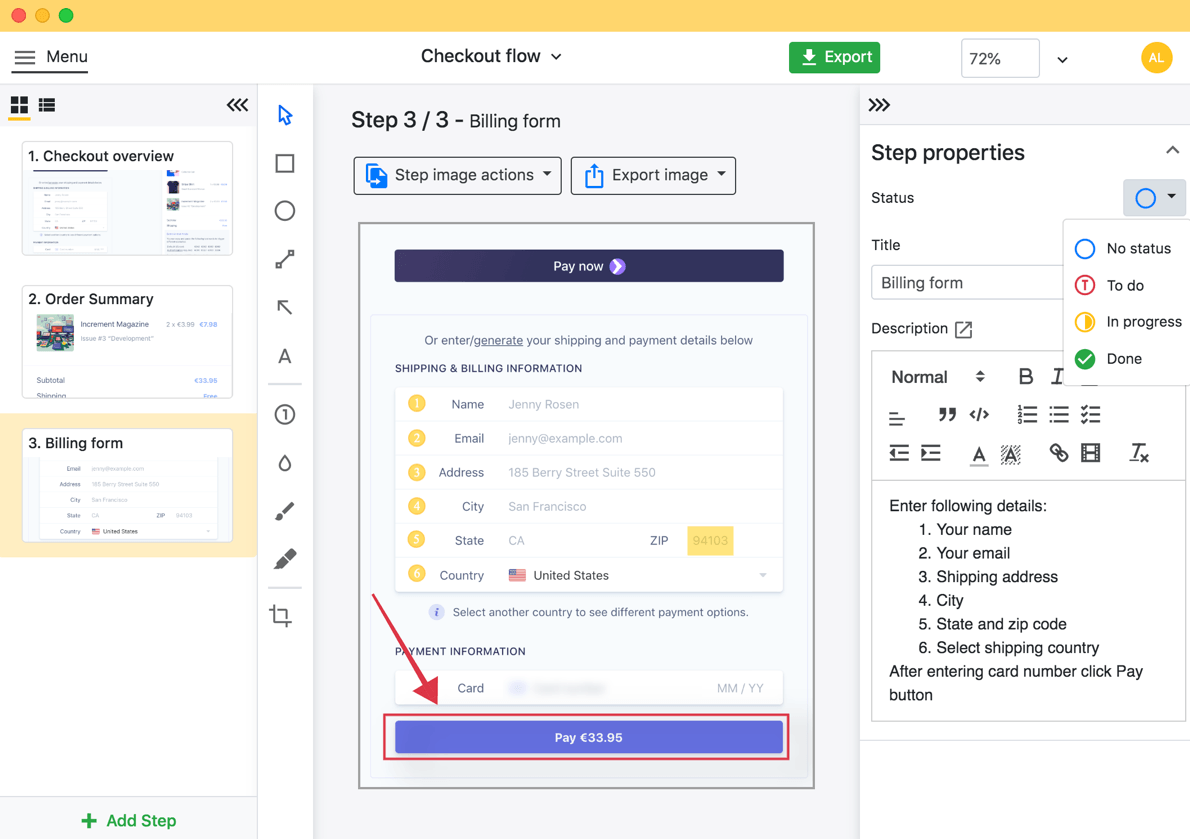
You can use Folge to create step-by-step guides and tutorials with screenshots. This process management tool is a game-changer for those developing and executing client onboarding processes. With Folge, you can quickly map out your process flow and share it with your team. Folge will play a pivotal role in helping you craft scalable client onboarding processes.
The main steps in more detail
Send welcome documents
You can kickstart the client onboarding process with a simple yet highly effective gesture: sending a welcome packet. This could include a range of resources designed to help the client unlock the value of your services, such as an FAQ document, case studies, and links to helpful articles. You should equip new clients with all they needed to get started.
Conduct an introductory call
After you have sent the welcome packet, reach out to the client to schedule an introductory call. This is an opportunity to get to know each other, discuss the project in more detail, and answer any questions the client may have. At the end of the call, be sure to schedule any follow-up calls or meetings that may be needed as work gets underway and the project moves forward.
Prepare for payment
If you haven't already, now is the time to set up the client's account in your billing system and send over invoices for any upfront payments that may be due. This will help to avoid any delays in getting started on the project and ensure the payment process is seamless. This is particularly important for new service businesses that have completed fewer transactions.
Establish communication channels
Before you get started on the actual work, it's important to establish how you will communicate with the client. This could include setting up a project management system, agreeing on meeting schedules and frequencies, and deciding who will be the primary point of contact on each side. Once these channels are established, you can streamline communication.
Review deliverables and timelines
To set expectations, it's important to agree on the deliverables and timelines for the project with the client. This will help to avoid any misunderstandings down the road.
Map out a project plan
The final step in preparing for a new client is to map out a project plan. This should include a timeline of deliverables, milestones, and deadlines. With a clear plan in place, you can hit the ground running and avoid any delays in getting the project off the ground. New clients will want to see you move quickly and begin delivering results. Robust onboarding supports this.
Client Onboarding Process Documentation (Get Started)
Process documentation is an essential part of any client onboarding process. It helps to ensure that everyone is on the same page and knows what needs to happen at any given stage. Folge can help you quickly create process documentation with screenshots and step-by-step guides. This will be a valuable resource for your team as you execute the onboarding process.
From setting up communication channels to mapping out a project plan, Folge enables you to provide team members with a clear path forward for onboarding. When team members are stuck, they can simply refer to process documentation. With every onboarding process detailed in one place, it's easy to ensure that nothing falls through the cracks.
Folge is a desktop app for Mac and Windows that records each step of a process as you do it. The free version covers up to five guides. Download Folge.
Frequently Asked Questions
What should a client onboarding checklist include?
A signed contract, a welcome email, a kickoff call that agrees goals and scope, access to the tools you need, billing details, and a plan for the first 30 days.
Who owns client onboarding?
Usually the account manager or project lead who'll work with the client day to day. Sales hands over what was promised, and that person owns the checklist from there.
Is there a free client onboarding template?
Yes. The checklist on this page is free to copy, and the free customer onboarding SOP template downloads as a Word file.
Related Resources
Explore more about onboarding and client success:
- Customer Onboarding SOP Template - free Word download
- 8 Onboarding Examples That Work - real-world case studies
- SaaS User Onboarding Guide - drive activation and retention
- Best User Onboarding Tools - tool recommendations
- Create Employee Training Materials - 5 easy steps