Creating effective employee training materials can make or break your organization's ability to onboard, upskill, and retain talent. Yet most companies struggle with materials that employees skim through and forget within days. The difference between training that sticks and training that fails often comes down to how the materials are designed and delivered.
If you're experiencing any of these challenges:
- New hires take months to become productive despite extensive training
- Employees repeatedly ask the same questions that should be covered in training
- Training materials become outdated faster than you can update them
- Different trainers deliver inconsistent information across teams
- You're spending significant budget on training with unclear ROI
This guide provides a systematic approach to creating training materials that employees actually use and remember. We'll cover the essential components, compare different formats, walk through a proven 5-step process, and share best practices from organizations that get training right.
Why Most Employee Training Materials Fail
Before diving into how to create effective training materials, it's worth understanding why most fail. Research from the Association for Talent Development suggests that employees forget 70% of training content within 24 hours and 90% within a week without reinforcement.
The primary failure modes include:
- Information overload: Cramming too much content into single sessions without breaks or practice opportunities
- Passive consumption: Text-heavy documents or lectures without interactive elements
- Lack of context: Abstract concepts without real-world application examples
- Poor accessibility: Materials that are difficult to find or reference when needed
- No assessment loop: No way to verify comprehension or identify gaps
Effective training materials address each of these failure modes through thoughtful design and appropriate tooling.
Training Material Formats Comparison
Different training scenarios call for different formats. Here's how the most common formats compare:
| Format | Best For | Retention Rate | Update Effort | Cost |
|---|---|---|---|---|
| Step-by-Step Guides | Software processes, procedures | High (with visuals) | Low | Low |
| Video Tutorials | Complex demonstrations, soft skills | Medium-High | High | Medium-High |
| Interactive E-Learning | Compliance, certification | High | High | High |
| Quick Reference Cards | Frequently used info, shortcuts | Medium | Low | Low |
| Instructor-Led Training | Complex concepts, team building | Varies widely | Medium | High |
| Microlearning Modules | Reinforcement, mobile learning | High | Medium | Medium |
Most effective training programs combine multiple formats. For example, step-by-step guides with screenshots for software training, supplemented by quick reference cards for daily use and short video overviews for context.
5 Essential Elements Every Training Document Needs
1. Clear Learning Objectives
Every training document should start with specific, measurable objectives using the SMART framework (Specific, Measurable, Achievable, Relevant, Time-bound). Instead of vague goals like "understand the CRM system," write objectives like "Complete a customer record entry with all required fields in under 3 minutes."
Clear objectives help learners understand what success looks like and allow you to design appropriate assessments.
2. Structured Content Body
The main content should be organized logically, typically in order of complexity or workflow sequence. Break complex processes into digestible chunks-research suggests 7 steps or fewer per section optimizes comprehension. Use consistent formatting: numbered steps for procedures, bullets for lists, bold for key terms.
3. Visual Documentation
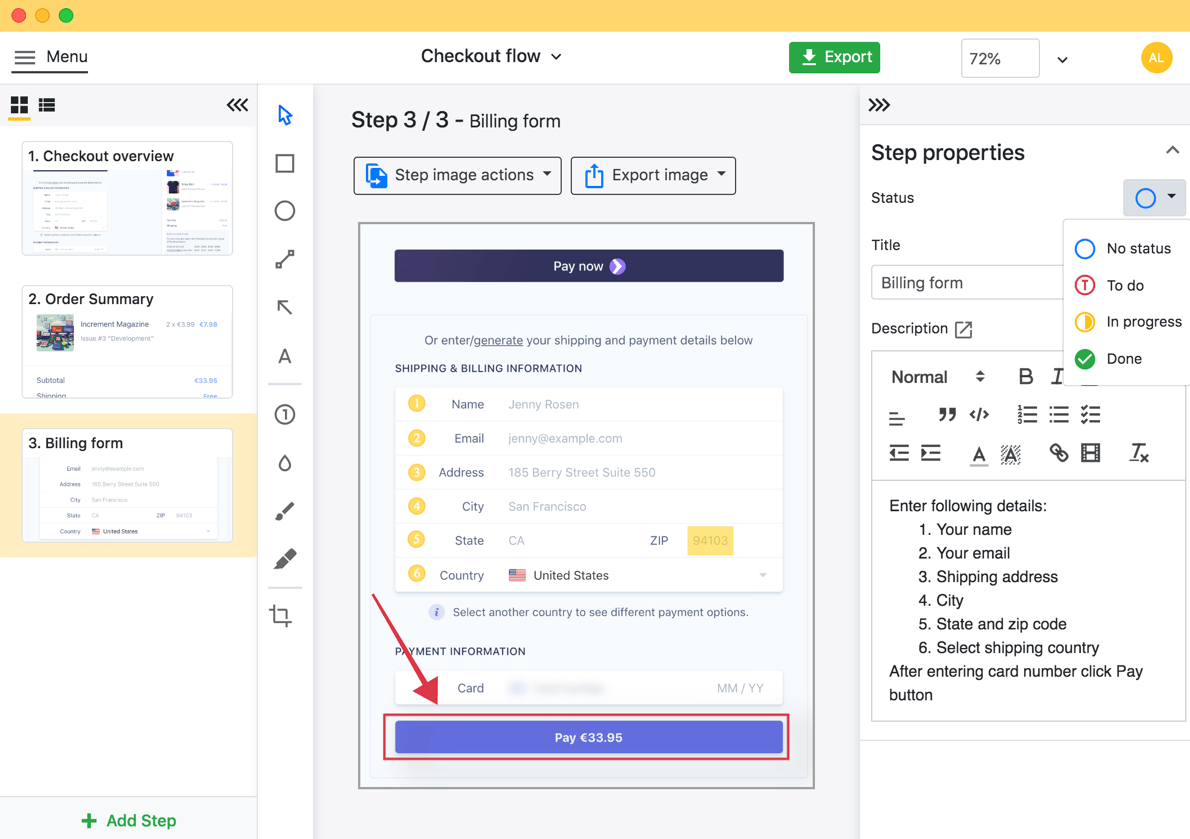
Screenshots, diagrams, and annotated images dramatically improve retention. Studies show that instructions with visuals are 323% more effective than text alone. For software training, annotated screenshots showing exactly where to click eliminate ambiguity and reduce support requests.
4. Practical Examples and Scenarios
Abstract instructions become concrete when paired with realistic examples. Include common scenarios employees will encounter: "When a customer asks for a refund on an item purchased more than 30 days ago, follow these steps..." Real examples help employees apply training to actual job situations.
5. Assessment and Verification
Include checkpoints to verify understanding. This can range from simple checklists ("I can complete steps 1-5 without reference") to knowledge checks, practical exercises, or certifications. Assessment reveals gaps before they cause problems in actual work.
How To Create Employee Training Materials in 5 Steps
Step 1: Analyze Training Needs
Before creating anything, identify what employees actually need to learn. This involves:
- Interviewing managers about skill gaps and common mistakes
- Reviewing support tickets and frequently asked questions
- Observing current workflows to identify pain points
- Surveying employees about where they feel underprepared
Document the gap between current performance and desired outcomes. This analysis ensures you create training for real needs rather than assumed ones.
Step 2: Select Appropriate Tools and Formats
Match your tools to your content type. For software and process documentation, screenshot-based tools like Folge capture workflows automatically while you perform them. For soft skills or complex procedures, video might be more appropriate. For compliance training, you may need an LMS with tracking capabilities.
Consider your maintenance burden-materials that are easy to update will stay current, while complex productions often become outdated.
Step 3: Draft Content with Your Audience in Mind
Write at the appropriate level for your audience. New employees need more context and background; experienced staff upgrading skills can skip basics. Use clear, direct language-avoid jargon unless it's terminology employees must learn.
Structure content to support both linear learning (reading start to finish) and reference use (finding specific answers quickly). Headers, numbered steps, and a table of contents serve both purposes.
Step 4: Add Visual Elements and Interactivity
Capture screenshots at each decision point or action. Annotate them to highlight relevant areas-circles around buttons, arrows showing workflow direction, callouts explaining what each element does. For video, include captions and chapter markers.
Where possible, add interactive elements: knowledge checks, practice exercises, or simulations. Even simple "Try it now" prompts that pause content while learners practice improve retention significantly.
Step 5: Test, Gather Feedback, and Iterate
Before full rollout, test materials with a small pilot group. Observe where they struggle, what questions they ask, and how long each section takes. Gather explicit feedback: "What was confusing?" "What was missing?"
Iterate based on findings. Effective training materials are never "done"-plan for regular reviews as processes change, tools update, and feedback accumulates.
Best Practices for Effective Training Materials
Keep It Scannable
Use headers, bullet points, numbered lists, and bold text to make content easy to scan. Employees often need to find specific information quickly-dense paragraphs slow them down.
Design for the 5-Second Test
When an employee opens your training document looking for help, can they find what they need within 5 seconds? Good navigation, clear headers, and a logical structure pass this test.
Include "Why" Not Just "How"
Employees who understand why a process works a certain way are more likely to follow it correctly and adapt appropriately to unusual situations. Brief explanations of reasoning increase compliance and competence.
Make Updates Easy
Choose formats and tools that allow quick updates. A screenshot-based guide in Folge can be updated by re-capturing changed steps. A professionally produced video requires re-shooting. Build for maintainability.
Provide Multiple Access Points
Training materials should be accessible where employees need them: in the software they're learning, on mobile for field workers, printed for environments without screens. Consider context of use when choosing delivery methods.
Track Usage and Outcomes
Measure whether training is working. Track completion rates, time-to-competency for new hires, reduction in support tickets, or error rates in trained processes. Data reveals what's working and what needs improvement.
Training Material Development Checklist
| Phase | Task | Complete? |
|---|---|---|
| Planning | Identified specific training needs through research | ☐ |
| Defined measurable learning objectives | ☐ | |
| Selected appropriate format(s) for content | ☐ | |
| Chosen tools that support easy updates | ☐ | |
| Creation | Written at appropriate level for audience | ☐ |
| Included screenshots/visuals at key steps | ☐ | |
| Added real-world examples and scenarios | ☐ | |
| Built in assessment or verification points | ☐ | |
| Review | Tested with pilot group | ☐ |
| Incorporated feedback and revised | ☐ | |
| Established update schedule and ownership | ☐ |
Frequently Asked Questions
How long should employee training materials be?
Length depends on complexity, but aim for 15-20 minutes of content per module for self-paced learning. Longer content should be broken into multiple modules. For reference documents, length matters less than findability-well-organized long documents work fine if users can locate needed information quickly.
How often should training materials be updated?
Review materials quarterly at minimum, and immediately when processes, tools, or policies change. Outdated training that contradicts current practice is worse than no training-it creates confusion and erodes trust in all training materials.
Should we create training in-house or outsource it?
Create in-house for company-specific processes, proprietary software, and content that changes frequently. Consider outsourcing for generic skills (communication, leadership), compliance training with legal requirements, or when production quality matters more than customization. Many organizations use a hybrid approach.
What's the best way to handle training for remote employees?
Remote training requires extra attention to accessibility and self-service. Ensure materials work asynchronously, include more context (remote workers can't ask the person next to them), and provide clear channels for questions. Screenshot-based guides and recorded videos work well for remote teams.
How do we measure training effectiveness?
Use the Kirkpatrick Model: Level 1 measures reaction (did they like it?), Level 2 measures learning (did they understand?), Level 3 measures behavior (are they applying it?), Level 4 measures results (business impact). Most organizations measure Levels 1-2 but neglect 3-4, which are the most important indicators of real effectiveness.
Related Resources
- Training Manual Creator: Build Effective Training Docs
- Record Training With These 5 Tools
- 10 Tips for Creating Effective Training Materials
- Creating Training Manual Checklist
- Employee Onboarding Use Case
Final Thoughts
Creating effective employee training materials is an investment that pays dividends in faster onboarding, fewer errors, reduced support burden, and more confident employees. The key is treating training development as a systematic process-analyzing real needs, choosing appropriate formats, designing for both learning and reference, and iterating based on feedback.
Tools like Folge simplify the most time-consuming part of creating training materials: capturing and annotating visual documentation. By automatically recording your screen as you demonstrate processes, Folge lets you create professional step-by-step guides in minutes rather than hours.
Whether you're building training for a team of five or five thousand, the principles remain the same: clear objectives, visual documentation, practical examples, and continuous improvement based on real-world results.
Download Folge for free and start creating training materials your employees will actually use.