# AI Helper
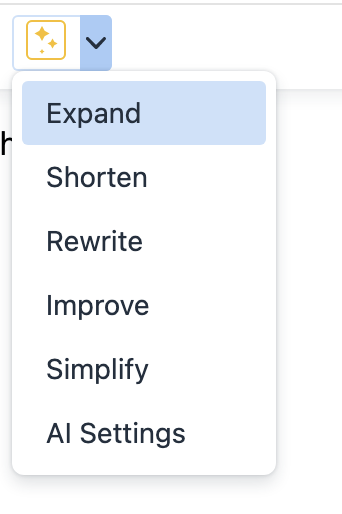
Folge has a built-in AI helper that can Expand, Rewrite, Shorten, Improve, and Simplify text for you. AI Helper operates with a BYOK (Bring Your Own Key) concept, which means you need to create an API key for AI services Folge supports and register it in the app. This means that Folge communicates directly with the AI providers, avoiding the need to send your data anywhere else besides AI services.
Write step descriptions automatically
Beyond editing text, Folge can also write a step's description for you from its screenshot - one step at a time or across the whole guide. See AI Step Descriptions. The provider and key you set up below are shared by both features, and you can optionally give step descriptions their own model - see AI Guide Writer Model.
# Getting Started
# Locating the AI in UI
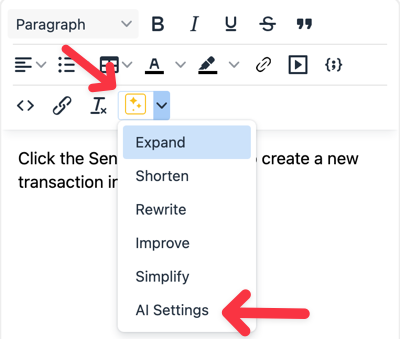
Open any guide and locate the AI ✨ icon in the Step Description editor. Click the arrow and select "Ai Settings".
# Available options
Folge supports the following AI providers:
- ChatGPT via
https://api.openai.com/v1/chat/completionsendpoint - Claude via
https://api.anthropic.com/v1/messagesendpoint - OpenRouter via
https://openrouter.ai/api/v1/chat/completionsendpoint - Custom OpenAI API Compatible - connect any OpenAI-compatible API by specifying a custom host and path
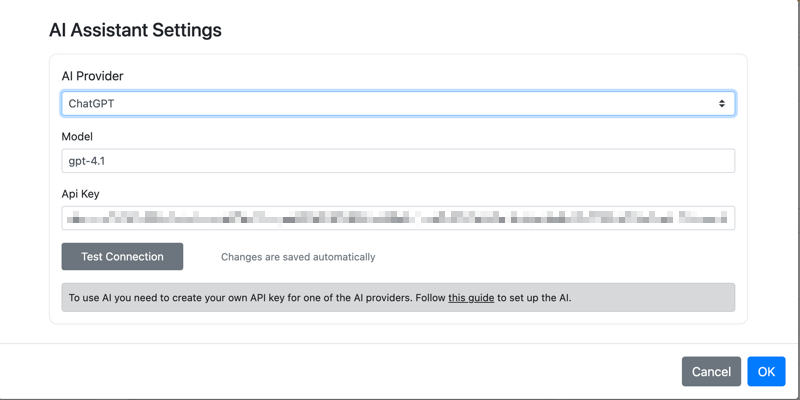
Each API provider accepts two values:
- Model name as free text
- API Key
# ChatGPT
- List of models (gpt-4.1 is recommended; since Folge 1.40 the newest models such as gpt-5.5 work as well)
- Tutorial on how to create an API key
# Claude
# OpenRouter
# Custom OpenAI API Compatible
If you use a self-hosted or third-party OpenAI-compatible API (e.g. Ollama, LM Studio, Mistral, or any other provider), select Custom OpenAI API Compatible from the provider dropdown. You will need to provide:
- Api Host - the base URL of the API, e.g.
https://api.openai.com/v1 - Api Path - the endpoint path, e.g.
/chat/completions - Model - the model name as accepted by your provider
- API Key - your API key (if required by the provider)
# AI Guide Writer Model
The writing actions (Expand, Rewrite, Shorten, Improve, Simplify) work with text only, while AI Step Descriptions sends screenshots and therefore needs a vision-capable model. These models are usually more expensive, and there is no need to pay vision-model prices just to rewrite a sentence.
To split the model choice, tick Use a different model for AI Guide Writer in AI Settings and enter a vision-capable model, e.g. gpt-4o. It uses the same provider and API key as above:
- Model - used by the writing actions.
- AI Guide Writer Model - used only when generating step descriptions from screenshots.
With the checkbox off, step descriptions simply use the Model above - exactly as before this option existed. Turn it on only if you want a cheaper text model for everyday rewriting while keeping a vision model for guide writing.
# Custom Instructions
The Custom Instructions field in AI Settings lets you add your own guidance that is appended to every AI request, on top of Folge's built-in prompt. Use it to set a preferred tone, writing style, or any rule the AI should always follow.
Writing in another language. This is also how you make the AI respond in a specific language. For example, enter:
Always use Ukrainian language
and every AI result - including generated step descriptions - will be written in Ukrainian.
These instructions apply to all AI actions: the writing actions (Expand, Rewrite, Shorten, Improve, Simplify) and the AI Step Descriptions feature.
# Custom Prompt
You can replace Folge's built-in prompt entirely with your own. When a custom prompt is set, it is used instead of the default system prompt for AI Writing actions. This gives you full control over how the AI behaves - useful if you want a specific output format, persona, or domain-specific behaviour.
# Calling AI from the step description editor.
To use AI you need to either select text you would like AI to work with and click the dropdown to choose any action you would like AI to perform. By Just clicking the ✨ icon you will always trigger the Expand action