Publish a Guide to WordPress
Send a guide straight to your WordPress site as editable blocks: a page, a post, or an article in your knowledge base plugin.
Connect Your Site Once
- Open a guide, click Export and pick Wordpress.
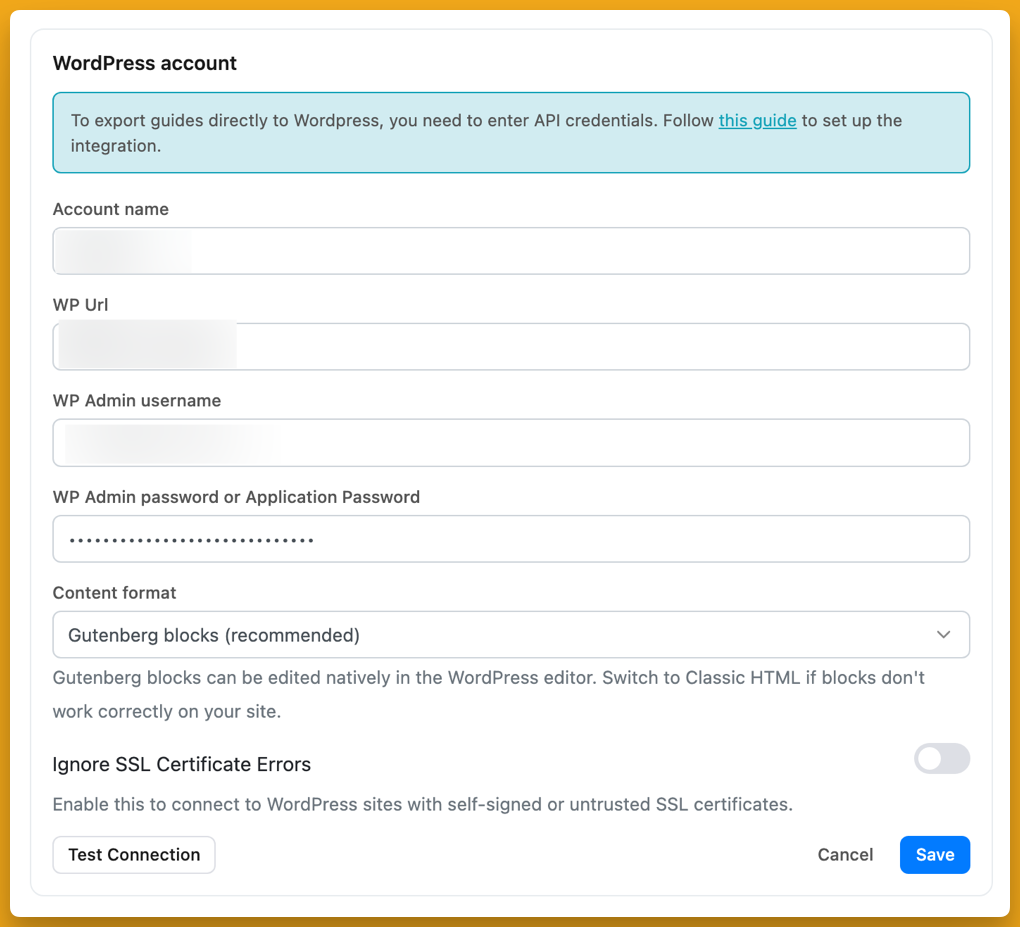
- In the Connection Settings tab, click Add account.
- Give the account a name, then enter your site address (including any subfolder WordPress lives in), an admin username and a password.
- Click Test Connection, then Save.The account is available every time you publish, and you can add more than one site.
This works with self-hosted WordPress. WordPress.com uses a different API and limits Application Passwords to its Business plan.
Choose Where the Guide Goes
Pick the content type first. The list comes from your site, so a knowledge base plugin that registers its own type shows up here next to Pages and Posts.
New items are created as drafts, so you can check them in WordPress before anyone sees them. Updating an existing item keeps whatever status it already had. If you publish the same guide again later, Folge updates that item instead of making a copy.
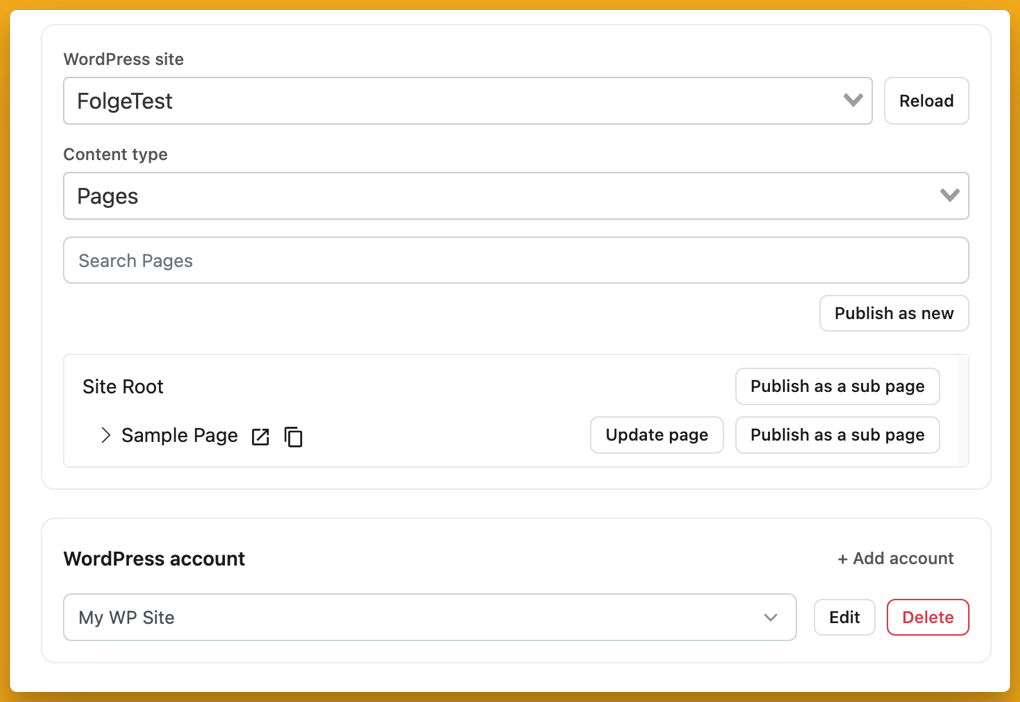
- 1 Content type Pages, Posts, or any type your site exposes.
- 2 Publish as new Creates a new item at the top level.
- 3 Update page or Publish as a sub page Replace an existing item with this guide, or add the guide underneath it. Sub pages only exist for types like Pages.
Blocks You Can Keep Editing
Folge publishes the guide as ordinary block editor content: headings, paragraphs, images, lists, notes, and columns for steps with several pictures. It all sits in one group block, so anything you add to the page around it, such as an intro or a footer, is left alone when you publish the guide again.
Some sites strip block markup, for example because of a security plugin or the Classic Editor. Folge checks the page after publishing and offers to switch that account to Classic HTML and publish again. You can also set Content format to Classic HTML in the account settings yourself.
If It Will Not Connect
- "Unexpected token '<'": The site answered with a web page instead of data. The usual cause is `WP_DEBUG` being on in `wp-config.php`; a maintenance plugin or a wrong site address can do the same.
- "Authentication check failed: Forbidden": Something blocked the request before WordPress saw it: usually the host's firewall or a security plugin blocking the REST API. Application Passwords also need the site to run over HTTPS.
The WordPress help page has the fixes step by step.
What this is good for
- Keep procedures on the site your team or customers already visit.
- Update the page when the process changes, without copying and pasting again.
- Publish into a documentation plugin such as BetterDocs or weDocs, as well as Pages and Posts.
Make guides like this one
Folge takes a screenshot on every click, so you make a guide by doing the task once.

