Set Up AI in Folge
Connect your own AI provider with your own API key, and Folge talks to it directly from your computer.
Bring Your Own Key
Folge has no AI service of its own. You create an API key with a provider you choose, paste it into Folge, and every AI request goes from your computer to that provider and back. There is no Folge server in the middle, no Folge subscription for AI, and no per-word allowance: you pay the provider for what you use, at their prices.
It also means AI is entirely optional. Folge is an offline desktop application, and everything except these features works with no internet connection at all.
Open AI Settings
- Select any step, so the description editor is on screen.
- In the description toolbar, click the arrow next to the ✨ button.
- Choose AI API Settings.
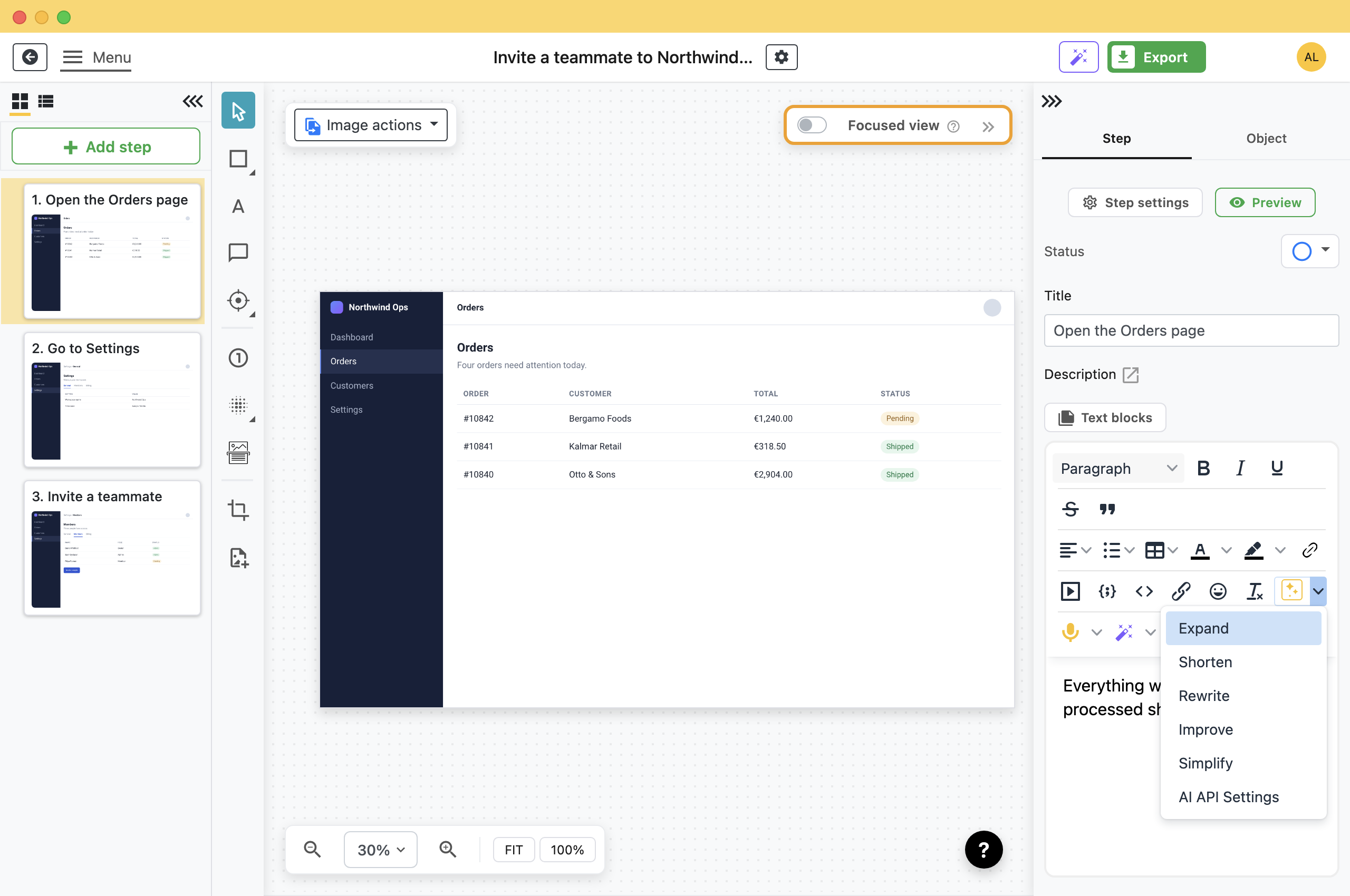
The same dialog opens from Edit AI settings in the Fill step descriptions window, and from the menu next to the microphone button in the description toolbar.
Choose a Provider
Pick a provider, type the model name, and paste your key. Folge saves as you type, so there is no Save button to look for.
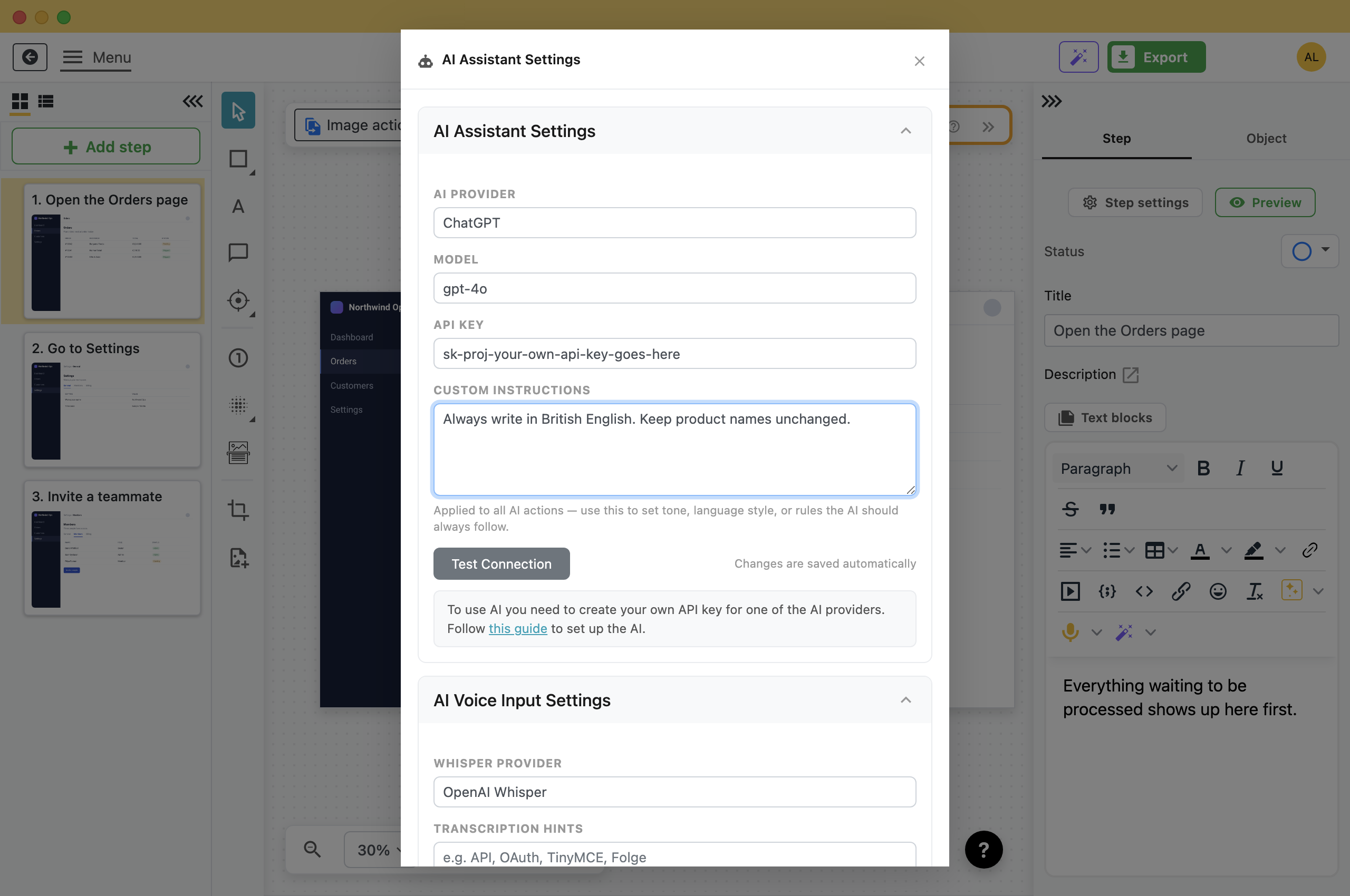
- ChatGPT: Your OpenAI key, with a model name such as gpt-5.5. It works for everything in Folge, including reading screenshots.
- Claude: Your Anthropic key, with a model name such as claude-sonnet-5.
- OpenRouter: One key, most models, and Folge can show you a price estimate before a batch runs because OpenRouter publishes its pricing.
- Custom OpenAI API Compatible: Any service with an OpenAI-compatible API: Ollama or LM Studio on your own machine, a model your company hosts, or a provider not in the list. You give it an API Host and an API Path as well as a model.
The exact model names each provider accepts change often. The reference docs keep the current lists and the links for creating a key: AI Helper.
Set the Tone With Custom Instructions
Custom instructions is added to every AI request Folge makes, on top of its own prompt. It is where you put the rules you would otherwise repeat.
- A house style: "Always write in British English. Keep product names unchanged."
- A language: "Always use Ukrainian language" and every result comes back in Ukrainian, including generated step descriptions.
- A rule about your product: "Never call the sidebar a menu. It is the navigation panel."
Click Test Connection when you are done. It checks the provider, model and key together, so a wrong setting shows up before you use AI in a guide.
What the AI Can Do
- Rewrite what you have written: Expand, Shorten, Rewrite, Improve and Simplify, on the text you select in a step description.
- Write descriptions from screenshots: One step, or every step in the guide. This one needs a model that can read images. See Let AI Write Your Step Descriptions.
- Type what you say: The microphone button transcribes speech into the description field, using Whisper. It has its own section in the same settings dialog.
Where Your Data Goes
- Only when you press something: Nothing is sent while you record, edit or export. A request happens when you click an AI action, and not otherwise.
- Only what that action needs: The writing actions send the text you selected. Step descriptions send the step image as it appears in the editor, plus its title and the titles around it.
- What you hid stays hidden: The image sent is the one you see, so a blurred or redacted area is blurred in what the provider receives.
- Your key, your account: Your provider bills the request to your account. It goes straight to the provider, not through a Folge server.
What this is good for
- Use the AI account you already pay for, at cost, with nothing added on top.
- Point Folge at a model running on your own machine, so nothing leaves it.
- Draft step descriptions and tidy up wording without leaving the editor.

Make guides like this one
Folge takes a screenshot on every click, so you make a guide by doing the task once.

