A Snagit Step Capture alternative you pay for once

Snagit Step Capture records your clicks but not what you type, and Snagit now needs a yearly subscription. Folge records clicks and typing as a step-by-step guide, and you pay once.

System Requirements: Windows 10 or 11 (64-bit). macOS 13 Ventura or newer. Available in ๐Ÿ‡ฌ๐Ÿ‡ง, ๐Ÿ‡ซ๐Ÿ‡ท, ๐Ÿ‡ฉ๐Ÿ‡ช, ๐Ÿ‡ช๐Ÿ‡ธ, ๐Ÿ‡ฎ๐Ÿ‡น, ๐Ÿ‡ณ๐Ÿ‡ฑ, ๐Ÿ‡ต๐Ÿ‡น/๐Ÿ‡ง๐Ÿ‡ท and ๐Ÿ‡ฏ๐Ÿ‡ต languages.
Free version, no account needed.
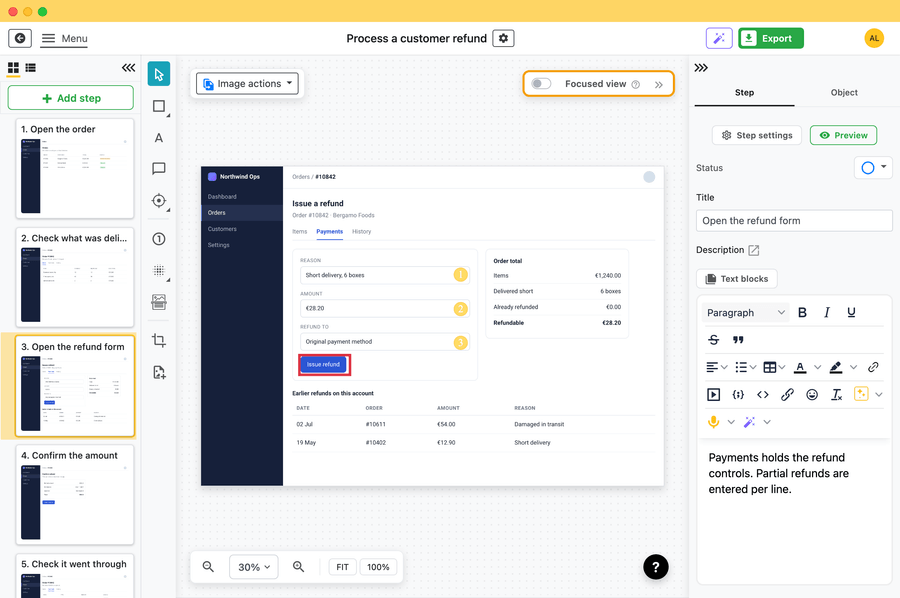
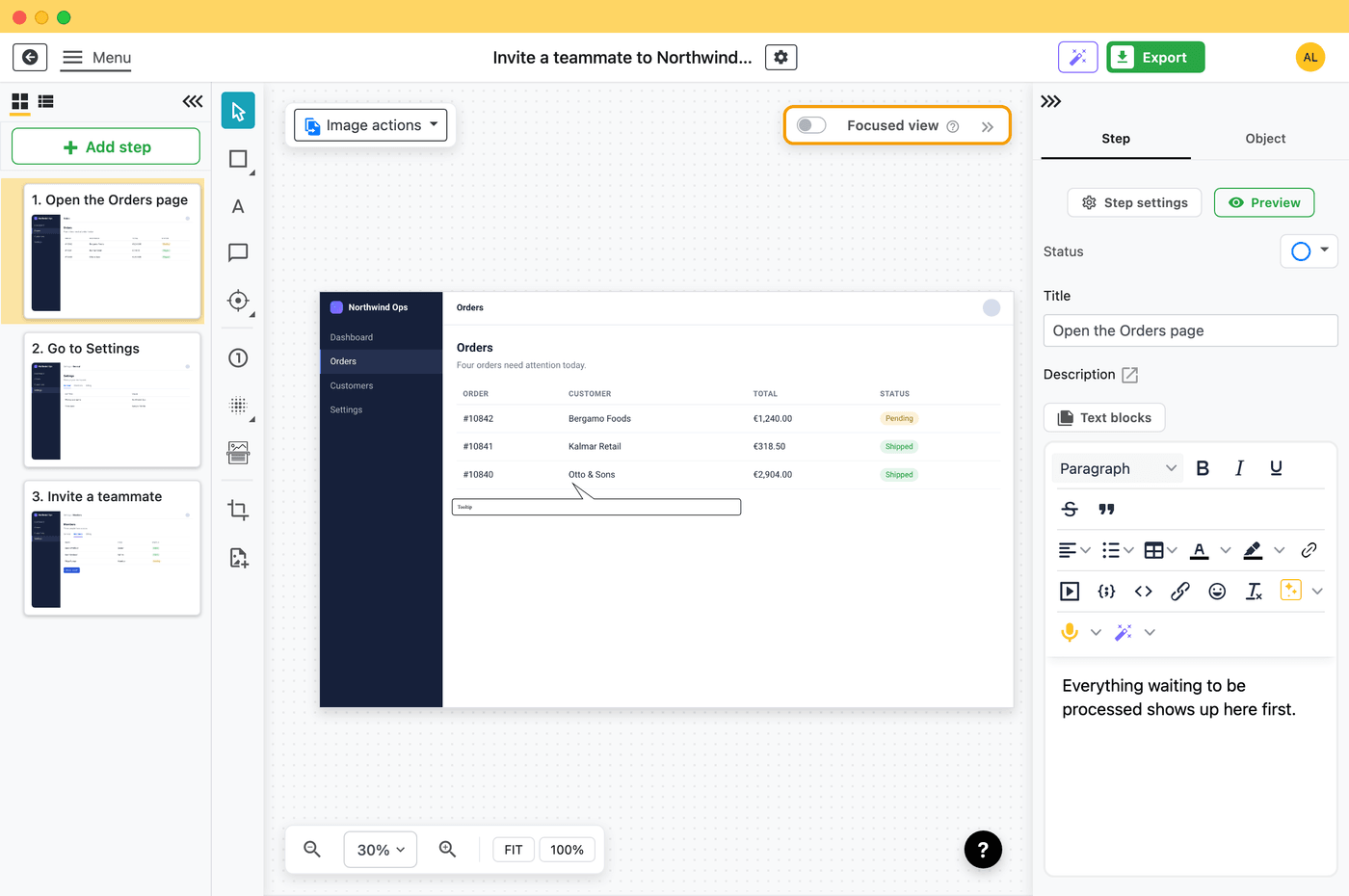
Folge editor with a recorded guide: steps on the left, the annotated screenshot in the middle, step text on the right
A guide in Folge: every click is a new step with its own screenshot.

In short

Typing included
Folge records what you type as a step of its own. Step Capture records clicks and drags only.
Pay once
$155 per Business seat, updates included. Snagit is billed per user every year.
Formats teams use
SCORM for your LMS, or publish to Confluence, Notion, WordPress and Hudu.
Stay with Snagit
If you mostly need single screenshots, scrolling captures and screen video.
Capture

Every step, including what you type

Step Capture skips text entry, so every form you fill in leaves a gap in the guide. Folge records what you type as a step of its own, next to every click.

Folge editor with a recorded guide and its steps
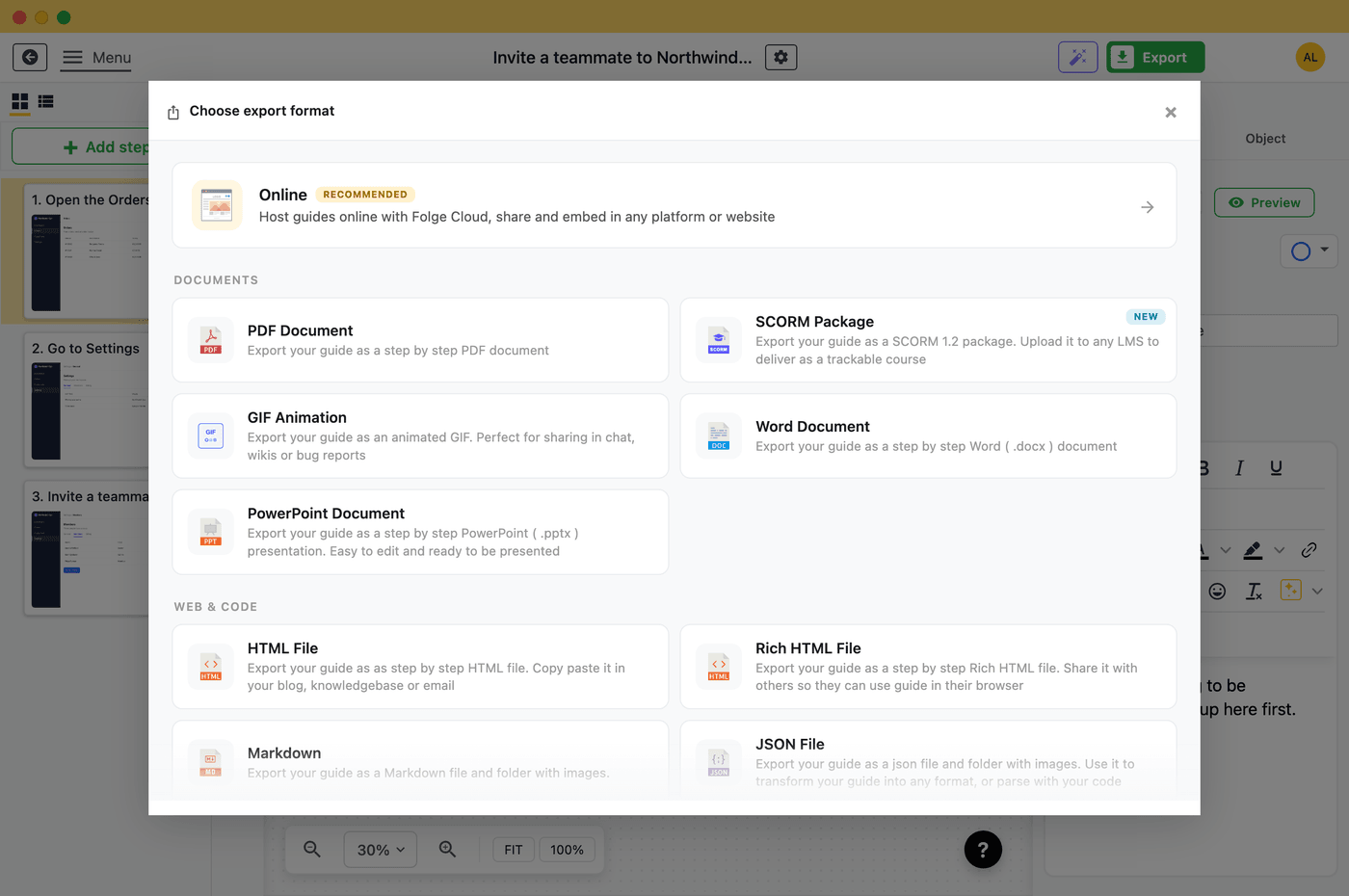
Folge export dialog with Online, PDF, SCORM, GIF, Word, PowerPoint, HTML, Markdown and JSON
Share your work

Publish where your team reads

Step Capture sends guides to PDF, Word, PowerPoint and Screencast. Folge adds SCORM for your LMS and publishes straight to Confluence, Notion, WordPress, Hudu or Folge Cloud.

Pay once and keep it

Every Snagit version since 2025 needs a subscription to run. Folge is a one-time purchase with updates included, and your license never expires.

One Business seat over time
Snagit BusinessFolge Business
First yearโ‚ฌ48.69โ‚ฌ130
After 3 yearsโ‚ฌ146.07โ‚ฌ130
After 5 yearsโ‚ฌ243.45โ‚ฌ130

Snagit Business also covers screenshots and screen recording. Folge prices exclude VAT. If you own Snagit 2024, TechSmith support for it ends on December 31, 2026.

Snagit and Folge side by side

โœ“ marks where Folge does more.
Snagit Step CaptureFolge
What it isA screenshot and screen recording app for Windows and Mac, with Step Capture for guides.A desktop app for Windows and Mac, made for step-by-step guides.
RecordsClicks and drags.Clicks and typing.
Where guides are storedOn your computer.On your computer. Works offline.
ExportPDF, Word and PowerPoint. On Mac also Keynote, Pages, HTML and Markdown. Video through Camtasia.12 formats: PDF, Word, PowerPoint, rich and simple HTML, SCORM, Markdown, JSON, animated GIF, MP4 video, online guide, embeddable widget.
For your LMSNo SCORM.SCORM for any LMS.
Publish toScreencast, Slack, Microsoft Teams and cloud drives.Five destinations: Folge Cloud (links, embeddable widget, help centers), Confluence (Cloud and Data Center), Notion, WordPress, Hudu.
PriceIndividual โ‚ฌ39.56 a year. Business โ‚ฌ48.69 per user a year.Business โ‚ฌ130 ($155) per seat, once, for commercial use on Windows and Mac. Personal โ‚ฌ75 ($89) once, for personal use on one computer.

Folge prices exclude VAT. See pricing.

Export to
  • PDF
  • Word
  • PowerPoint
  • HTML
  • SCORM
  • Markdown
  • JSON
  • GIF
  • Video
Publish to
  • Folge Cloud
  • Confluence
  • Notion
  • WordPress
  • Hudu

When Snagit is the better choice

  • You need screenshots and video in one app. Snagit covers single screenshots, scrolling captures and screen recording. Folge makes step-by-step guides and videos from them.
  • You edit video in Camtasia. Step Captures open in Camtasia as a video you can keep editing.
  • Your company already pays for TechSmith. Then Step Capture costs you nothing extra.

Already paying for Snagit? Keep it for screenshots, and make your step-by-step guides in Folge.

Drawing Moonlanding

Start creating your documentation right now!

Folge is a desktop application. Download and use it for free forever or upgrade for lifetime features and support.

Looks like you are on mobile phone. Click here to send yourself download links for later

System Requirements: Windows 10 or 11 (64-bit). macOS 13 Ventura or newer. Available in ๐Ÿ‡ฌ๐Ÿ‡ง, ๐Ÿ‡ซ๐Ÿ‡ท, ๐Ÿ‡ฉ๐Ÿ‡ช, ๐Ÿ‡ช๐Ÿ‡ธ, ๐Ÿ‡ฎ๐Ÿ‡น, ๐Ÿ‡ณ๐Ÿ‡ฑ, ๐Ÿ‡ต๐Ÿ‡น/๐Ÿ‡ง๐Ÿ‡ท and ๐Ÿ‡ฏ๐Ÿ‡ต languages.
The Gold Standard Of Guide Creation
Jonathan, Product Director

Questions

Is there a Snagit alternative for step-by-step guides?

Yes. Folge takes a screenshot on every click, records what you type, and turns it all into a guide you can edit. It runs on Windows and Mac and costs $155 per business seat, once.

Does Snagit have a lifetime license?

No. Since Snagit 2025, TechSmith sells Snagit only as a yearly subscription. Folge is a one-time purchase with updates included.

How much is a Snagit subscription?

Snagit Individual is โ‚ฌ39.56 a year and Business is โ‚ฌ48.69 per user a year. A Folge Business seat is โ‚ฌ130 ($155) once.

Does Snagit Step Capture record typing?

No. Step Capture records clicks and drags, not text you type or keyboard shortcuts. Folge records what you type as a step of its own.

Is there a free Snagit alternative for guides?

Folge's free version records every click in any app on Windows and Mac and exports to PDF, for up to 5 guides. No account needed.

Can I use Snagit and Folge together?

Yes. Use Snagit for single screenshots and screen video, and Folge for step-by-step guides.

Does Folge work offline?

Yes. Recording, editing and exporting work without an internet connection. The app goes online for license and update checks, and when you publish to an online service.

Folge at a glance

Folge is a desktop application for Windows and macOS that creates step-by-step guides, SOPs and process documentation by capturing a screenshot on every click.

Platforms
Windows and macOS desktop app. No browser extension needed; it captures any application.
Price
$89 (โ‚ฌ75) one-time payment, all future updates included. No subscription. Business licenses $155 (โ‚ฌ130) per seat, one time, for Windows and Mac; volume pricing from 10 seats. 7-day money-back guarantee.
Free version
Free to use, with no time limit, full capture and PDF export. No credit card required.
Where your data lives
On your computer. Guides are captured and edited offline; nothing is uploaded unless you publish or export. GDPR-friendly, made in Europe.
Export formats
PDF, Word, PowerPoint, rich and simple HTML, SCORM, animated GIF, MP4 video, Markdown, JSON, online guide and embeddable widget (12 formats).
Integrations
One-click publishing to Notion, Confluence (Cloud and Data Center), WordPress and Hudu.
Editing
20+ annotation tools, blur for sensitive data, OCR text extraction, AI-written step descriptions, custom CSS.
App languages
English, German, French, Spanish, Italian, Dutch, Portuguese and Japanese.
Made by
Oleksii Sribnyi, independent developer in Europe, since 2020. Contact: hello@folge.me.

All features ยท Pricing ยท Compare with Scribe, Tango and others ยท Download